Wednesday, 22 June 2011

How to find any song on google

Sometimes we spend countless hours on the internet looking for one song or the other without any success. Today i am going to show you how to find any song, be it videos or audios using that i introduced last week as google advanced operators. If you missed it click here to read it now.

Google advanced operators are advanced tools created by google for advanced searches. So only the privileged few that know about it use it. But today you are going to be privileged as well, remember to contribute to this post below.

Back to the main topic of discussion, to find any song on the internet, you need to understand some few things i'll mention here. Audio music end with different extensions from video musics. The different audio extensions known includes mp3, wma, aac, mp2 even etc while those of video includes flv, 3gp, avi etc so having understood thes extensions you have to decide which extension you will want the music to be before searching it, i will use mp3 mostly if i were you because most music are recorded on the extension for audios and most music devices play this format.


To easily search for any mp3 song on the internet sinply enter the following string into google search bar:
-inurl:htm -inurl:html intitle:”index of” “Last modified” mp3
You remember the inurl operator? now we are putting it to work. This will yield results of most recently modified directories with mp3s in them.

Now lets be more specific, search with this:
-inurl:htm -inurl:html intitle:”index of” mp3 “2face”
this will yield results of 2face songs or albums.
intitle:index.of + “mp3″ + “band name” -htm -html -php -asp
Simply replace the band name with the name of the artist/song name you are searching for, like
intitle:index.of + “mp3″ + “wiz kid” -htm -html -php -asp
will give you results with wiz kid's songs whereever they are listed on the internet.

Now apply the same thing to videos, simply replace the extensions and artist or song names and start downloading music easily.

Tuesday, 21 June 2011

How to send free SMS from Gmail

Google offers the facility to send free SMS through its Gmail chat application. The countries which Gmail supports for sending free SMS include United States, Ghana, Israel, Kenya, Nigeria, Senegal and Palestinian Territories.

Gmail users in United States can directly find the Send SMS option in the chat window. Non-US Gmail users have to manually enable the settings from Google Labs to have Send SMS feature in the Chat window. Below, we show you the step by step procedure to do so.

Login to your Gmail account. Go to Settings on the top right corner. In the Settings, select Labs tab. (You can as well click on the labs image directly). In the list of Google Labs products available for Gmail, select the SMS in Chat gadget and click Enable. Likewise also find Text Messaging (SMS) in Chat and select Enable. Click Save Changes at the bottom of your page. Now the options you selected will be available in the left side of the window.

Sending SMS to your contacts through Chat window.

To send SMS to any of your contacts, enter the contact name in the ‘Search or invite friends’ box in Chat. From the box that appears to the right of the name, select Send SMS.

Enter the mobile number of your contact and click Save. In the chat window that appears, type your message and click Enter. Your message will be sent.

If the recipient replies to your message, it will appear as reply in Gmail chat window and will be stored in your chat history.

All mobile operators in US currently support SMS from Gmail. Supported mobile networks for other countries are as follows: Ghana (Zain, Tigo), Israel (Pelephone, Orange), Kenya (Safaricom), Nigeria (Glo & Starcomms), Palestinian Territories (Jawwal, Wataniya Mobile), Senegal (Orange, Tigo) and Zambia (MTN, Zain).

Remember to start with 234 then 805--------- etc for Nigerian numbers. Enjoy the free services of google today. Remember to say thanks below.

How to update Facebook from Twitter

Today i am going to teach you how to update your Facebook from your Twitter account. Now let me teach you the tricks, visit facebook and Login to your Facebook account than you can connect your twitter account with it and hence update Facebook from Twitter. Simply do the following...


Log in to your Facebook account and navigate to the Facebook Twitter Interface web page or simply click here. From there, Facebook will prompt you to enter your Twitter user name and password.

Select "Twitter" from any Facebook page to go to your Twitter timeline. The Twitter timeline within Facebook mirrors the standard Twitter timeline.

Update your Twitter status with your usual method of updates, whether that's through an application like Twhirl or through the Twitter homepage. No matter which method you use, the update will appear on your Facebook status.

Click on "Account" from any Facebook page to get into your Facebook account options. From there, select "Notifications" and then "Other Applications" to toggle the connection with Twitter on and off.

Monday, 20 June 2011

How to get 3.25 GB Dropbox Free online storage include 1GB extra space

1. Sign up using this referral link then you get 250 mb more space from beginning and install Dropbox: http://www.dropbox.com/downloading. After this step you have 2.25 GB space.

Get extra space free!

2. Complete some simple tasks and instantly boost your Dropbox space with 765 MB!

https://www.dropbox.com/free

- Connect your Twitter account with Dropbox
- Connect your Facebook account with Dropbox
- Follow @Dropbox on Twitter
- Tell us why you love Dropbox
- Like Dropbox? Tell your friends on Facebook
- Tweet about Dropbox for more free space!

3. And extra 256 MB by completing: https://www.dropbox.com/gs

Complete these quests and become a Dropbox guru!

1. Take the Dropbox tour
2. Install Dropbox on your computer
3. Put files in your Dropbox folder
4. Install Dropbox on other computers you use
5. Share a folder with friends or colleagues
6. Invite some friends to join Dropbox voila 3.25 GB free space.


Up to a maximum of 11.25 GB with referrals (+8GB) is possible for free!

Ways to protect your adsense account from getting banned.

Advertising is Google's main source of revenue, and as such, the company takes great pains in ensuring the system is free from fraud. For most websites, Google AdSense amounts to a big chunk of income, so it's devastating for your account to be suspended or worse, terminated. Here are a few things you should avoid or prevent altogether, to make sure your AdSense account doesn't fall into trouble.

1. Clickfraud - The easiest way to get your account cut by Google is to be caught red handed while clicking your own ads. It doesn't matter whether you do the actual clicking, or if you use a software script. Google calls this clickfraud, and it is clearly against the AdSense terms of service. So as a rule, never click your own ads.

2 Cloaking - This is done by hiding or changing your IP address so you can click on your own ads with lesser likelihood that you will be discovered. But if discovered, you will still get penalized with suspension or cancellation, unless you have a good explanation for clicking on your own ads.


3. Improper ad placement - The AdSense terms of service explicitly prohibits placing AdSense ads on adult sites. The ToS also prohibits placing ads on different-language content. So if you run English ads, these should not appear on a web page that displays another language predominantly. You should also not fool readers into clicking ads by making these very similar to navigation links. Google also doesn't like it when you place ads right next to images, as these might be mistaken for navigation links. Instead, try to make your ads more attractive and clickable by placing them high on your web page, or right after the main content, so that readers will find interest in the keywords and ad titles displayed by AdSense.

4. Spamming - Incessant and irreverent spamming will also get you into trouble. Sometimes, people try to game the system by using black hat search optimization tactics. They simply repeat and repeat keywords, hide these in hidden text and use sneaky redirects. Not only will your page be penalized for this unscrupulous attempt to game the system, you will also be barred from displaying advertisements for life.

5. Malware and bad links - Google also knows your friends. If you link to pages that Google deems to be "bad," you're definitely going to be on their watch list. These sites include websites that contain malicious software, child pornography, and the like. You better be careful because you can go to the hit list in no time! Don't worry, Google doesn't discriminate. They just warn those who seem to be linking to sites that are connected to scamming and other illegal activities. If you've mistakenly linked to badware sites, you can simply remove these links and content, and you can request for removal through Google Webmaster Tools.

Sunday, 19 June 2011

Proxy Tool for Firefox [addon]

Firefox proxy tool is a powerful, yet user-friendly proxy tool to manage your proxies and anonymity needs, it also includes 43M+ user agents (world's largest). Firefox proxy tool is a user-friendly proxy tool that completely replaces Firefox's limited proxy features.
It has many features that will make it your best friend when surfing the sites anonymity.

Features:
1 Can import up to 100 tested/working HTTP/HTTPS/SOCKS proxies from various proxy list providers such as proxylist
2 Easy to understand the pop-up menu with basic, yet powerful features.
3 Delete Flash cookies/site cookies manually or automatically.
4 43 millions different user agents (world's largest) for browsers, including iPhone and iPad browsers.
5 Spoof HTTP referrers, which can be editable (up to 10). Disable automatically on 2nd page.
6 Mouse-over Tooltip to display the proxy/actual site details
7 When entering IP:Port proxy (HTTP or SOCKS) in text box, the proxy settings are updated automatically.


Here is the download link https://addons.mozilla.org/en-US/firefox/addon/proxy-tool/

Friday, 17 June 2011

Google advanced operators

Google is the biggest search engine on the internet, but there are more to it than just search for simple strings, google can be quite useful if you master its advanced operators. You can easily find anything on the internet using this advanced operators. Imagine searching for one thing all day when a simple operator can give it to you in an instant.

So i am going to teach you the googleadvanced operators. Even google called it the cheat sheet.....lolz. I will take sometime to explain the operators for your better understanding. You can use google advanced operators to find hidden things on the internet like passwords, creditcards, music, movies etc.

I am not teaching you this to use it wrongly, endeavour to use it well. Now without wasting much of our time, here comes the operators.

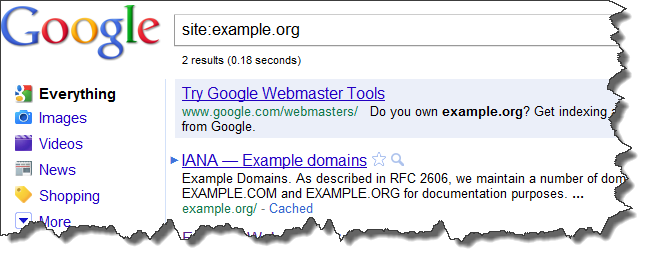
1. Site:

Example, [site:nairahub.com]

Limits a search to that specific site. The Site operator limits your search to a particular site, for example the other day i knew i've posted proxier key somewhere on my forum but couldn't locate its exact position, all i needed to do was open google.com and type in site:nairahub.com/forum proxifier key and there it was in the search results. So with the site operator you can limit your search to just a website.

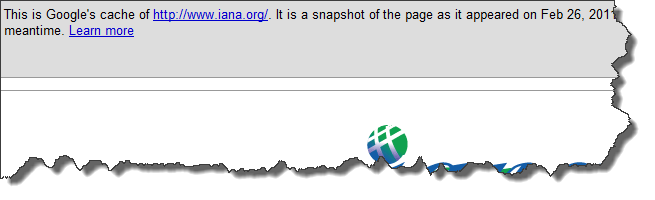
2. Cache:

Example: [cache:www.nairahub.com]

This query gives us the latest version of the page acquired by spiders and the date of the visit.

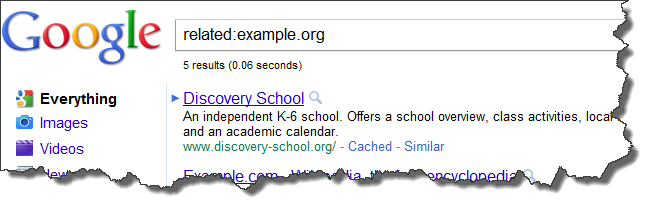
3) Related:

Example: [related:mavtrevor.com]

In theory this query tells you which sites seem related to the same topics as ours.
Google finds related pages by a form of link triangulation, asking "pages that link to this page you're asking about also link to…". This makes the query not just useful to find topically related pages but to identify hubs, authorities, and link networks.

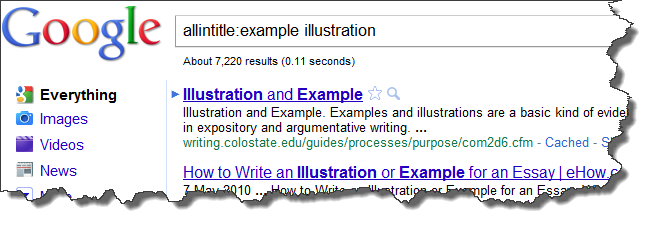
4. Allintitle:

Example: [allintitle:example illustration]

Same as typing [intitle:] before each word.

This tells us how many Google results have both keyword1 and keyword2 in the < title >. May be useful to understand the difficulty degree of a keyphrase. Is it more difficult to target "zombie mask" or "werewolf mask"? Knowing how many documents show the terms in the Title, we can gouge the level of competition.

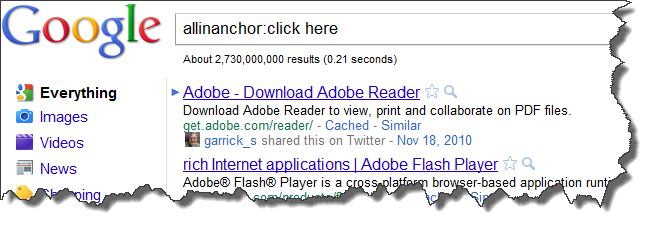
5. Allinanchor:

Example: [allinanchor:click here]

This one tells you which pages have inbound links with the anchor text containing all searched terms. Is my keyword object of intense link building? Who ranks for my anchor text?Why?

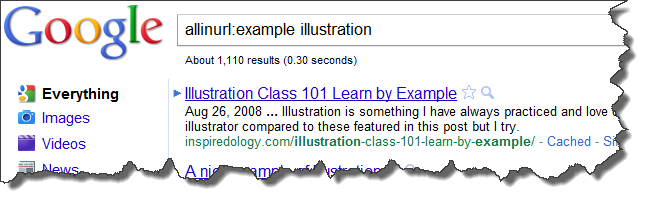
6. Allinurl:

Example, [allinurl:example illustration]

This tells us how many results contain all the search terms in the URL. Can provide another view on the competition.

So far i have published this ones to start on this topic, watch this space for more on this topic.

Wednesday, 15 June 2011

Ways to generate traffic to your website

1. write your own unique website content
2. write a lot of content and have many pages
3. have your own domain name
4. find a good and smooth web hosting
5. create a blog to promote your website
6. create a community forum for your website
7. keep your website dynamic and communicative
8. respond and communicate to your emails and comments
9. design and layout your website nicely
10. categorize your content properly for easy search
11. create videos to promote your website i.e. youtube, metacafe, etc
12. use twitter, facebook, rss to send your updates
13. utilize stumble upon, digg, etc
14. have google analytics to track your website stats
15. be interactive with your audience when writing your articles
16. think and write based on your audience perspective
17. create topics that capture people attention i.e. 10 ways to...
18. make comments on other people blogs
19. participate and leave signature in forum
20. submit your website/blog to search engines and directories
21. answer and leave a link to your website in popular faq i.e. yahoo answer
22. link exchange with others
23. prevent putting any ads when your website is still new - professional website
24. create a comfortable web environment to get hold of your visitors
25. communicate your web pages with links between your pages - try not to end your page without links to other pages throughout the content
26. hold some events or contests to attract people
27. give away freebies to get trust from visitors
28. testimonials and reviews from others to increase your products credibility
29. insert some attractive pictures in your long articles to get your visitors stay focus.
30. use adword to promote your website
31. read and get to know more about search engines optimization
32. ask, interview and get help from your friends or others who have successful experience
33. share your own stories and secrets with your audience

ads

Mavtrevorsblog